1. How to run OATM migration utility ---- Note:404954.1
2. 11.5.10 Oracle E-Business Suite Consolidated Update 2 (CU2)---- Note:316366.1
3. Upgrading Oracle Applications ---- Note:289788.1
4. E-Business Suite Diagnostics Patch Installation Guide ---- Note:167000.1
5. Step by Step Troubleshooting Guide to Solve APPS Invalid Objects ---- Note:113947.1
6. Compatibility Matrix for Export And Import Between Different Oracle Versions ----Note:132904.1
7. ORA-06550 Running Sys.Utl_recomp.Recomp_parallel(1) During ADPATCH or ADADMIN Session ---- Note:362727.1
8. Now Available: Oracle E-Business Suite Release 12.0.4 ---- Note:556312.1
9. Cloning Oracle Applications Release 11i with Rapid Clone ---- Note:230672.1
10.Upgrading Developer 6i with Oracle Applications 11i ---- Note:125767.1
11.The Basics About Report Review Agent (FNDFS) on 11i ---- Note:111383.1
12.How To Use FNDCPASS to Change The Oracle Users, APPS, APPLSYS and Application Module Passwords (INV, AR, AP, etc.) For Applications 11.5 in Unix ---- Note:159244.1
13.USAGE OF INDIA LOCALIZATION PATCH TOOL (INDPATCH) ---- Note:376756.1
14.Sharing the Application Tier File System in Oracle Applications 11i ----Note:233428.1
15.Shared APPL_TOP FAQ ---- Note:243880.1
16.Using a Staged Applications 11i System to Reduce Patching Downtime ---- Note:242480.1
17.Summary of Possible Reasons and Solutions for the Problem Where All Concurrent Requests Stuck in Pending Phase ---- Note:182154.1
18.Release 11i Adpatch Basics ---- Note:181665.1
19.How to Apply an 11i Patch When adpatch is Already Running ---- Note:175485.1
20.How to Create a Custom Concurrent Manager ---- Note:170524.1
21.Concurrent Manager Questions and Answers Relating to Generic Platform ----Note:105133.1
22.E-Business Suite Diagnostics Patch Installation Guide ---- Note:167000.1
Friday, September 05, 2008

Thursday, September 04, 2008
Oracle Apps DBA Important Tables
Oracle Apps DBA Important Tables
fnd_user
fnd_oracle_user_id
fnd_concurrent_requests
fnd_concurrent_programs_tr
fnd_concurrent_programs
fnd_responsibility
fnd_profile_option_values
fnd_menus
fnd_nodes
fnd_product_installations
fnd_application
fnd_product_groups
fnd_install_processes
ad_deferred_jobs
ad_applied_patches
ad_bugs
fnd_user
fnd_oracle_user_id
fnd_concurrent_requests
fnd_concurrent_programs_tr
fnd_concurrent_programs
fnd_responsibility
fnd_profile_option_values
fnd_menus
fnd_nodes
fnd_product_installations
fnd_application
fnd_product_groups
fnd_install_processes
ad_deferred_jobs
ad_applied_patches
ad_bugs
Oracle Database Important Tables
Oracle DBA Important Tables
v$database
v$controlfile
dba_data_files
v$datafile
dba_temp_files
v$tempfile
v$tempspace_header
dba_users
dba_db_links
v$link
dba_objects
dba_tables
dba_indexees
dba_ind_columns
dba_tab_columns
dba_sequences
dba_synonyms
dba_source
dba_views
dba_errors
dba_triggers
dba_roles
dba_role_privs
session_roles
dba_tablespaces
dba_tab_privs
role_tab_privs
session_privs
dba_ts_quotas
dba_registry
dba_rollback_segs
dba_properties
v$database
v$controlfile
dba_data_files
v$datafile
dba_temp_files
v$tempfile
v$tempspace_header
dba_users
dba_db_links
v$link
dba_objects
dba_tables
dba_indexees
dba_ind_columns
dba_tab_columns
dba_sequences
dba_synonyms
dba_source
dba_views
dba_errors
dba_triggers
dba_roles
dba_role_privs
session_roles
dba_tablespaces
dba_tab_privs
role_tab_privs
session_privs
dba_ts_quotas
dba_registry
dba_rollback_segs
dba_properties
How to apply India Localization Patches
How to apply India Localization Patches
1. How to apply india Localizatin Patches?
1. We have to install India localization Patch Application Tool by downloading patch 6491231
2. Copy the downloaded patch to $JA_TOP and unzip the same there
3. A directory inpatch will be created afer unzipping. In which india localization patch tool avaialable
4. Go to india localization patch directory
5. use following command
perl $JA_TOP/inpatch/indpatch.pl drvr_file=6355941.drv fnd_patchset=H appspwd=apps japwd=ja logfile=6355941.log systempwd=manager
fnd_patchset= FND PATCHSET LEVEL
japwd = ja_top password
drv_file=patchnumber.drv file
2. How do you know what are india localization patches applied?
Solution : using JAI_APPLIED_PATCHES
1. How to apply india Localizatin Patches?
1. We have to install India localization Patch Application Tool by downloading patch 6491231
2. Copy the downloaded patch to $JA_TOP and unzip the same there
3. A directory inpatch will be created afer unzipping. In which india localization patch tool avaialable
4. Go to india localization patch directory
5. use following command
perl $JA_TOP/inpatch/indpatch.pl drvr_file=6355941.drv fnd_patchset=H appspwd=apps japwd=ja logfile=6355941.log systempwd=manager
fnd_patchset= FND PATCHSET LEVEL
japwd = ja_top password
drv_file=patchnumber.drv file
2. How do you know what are india localization patches applied?
Solution : using JAI_APPLIED_PATCHES
Subscribe to:
Posts (Atom)
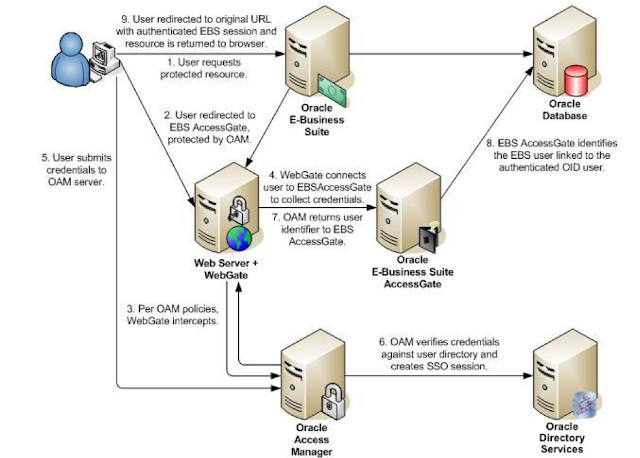
Oracle EBS integration with Oracle IDCS for SSO
Oracle EBS integration with Oracle IDCS for SSO Oracle EBS SSO? Why is it so important? Oracle E-Business Suite is a widely used application...
-
Apps password change routine in Release 12.2 E-Business Suite changed a little bit. We have now extra options to change password, as well ...
-
 Enabling TLS in Oracle Apps R12.2 Here we would be looking at the detailed steps for Enabling TLS in Oracle Apps R12.2 Introduction: ...
 -
 Oracle EBS integration with Oracle IDCS for SSO Oracle EBS SSO? Why is it so important? Oracle E-Business Suite is a widely used application...