Saturday, March 04, 2017

RMAN Cold Backup Script

rman target / <<EOF > TPROD_COLDBACKUP_11JAN09.log
run
{
allocate channel c1 type disk;
allocate channel c2 type disk;
allocate channel c3 type disk;
allocate channel c4 type disk;
backup as compressed backupset
TAG=COLDBKUP_TPROD_11JAN09
filesperset=10
format '/backups/db_backup/COLDBKUP_TPROD/TPROD_%d%s%t_%U' database;
release channel c1;
release channel c2;
release channel c3;
release channel c4;
}
exit
EOF

Oracle DST upgrade procedure from V14 to V25

DST upgrade procedure from V14 to V25

1. Check the invalid count before upgrade

select count(1) from dba_objects where status='INVALID';

2. Check the Tz version before upgrade.

SQL> SELECT version FROM v$timezone_file;

   VERSION
---------------
14

3. Bringdown apps services and Database and listerner

$ADMIN_SCRIPTS_HOME/adstpall.sh apps/apps

sqlplus '/ as sysdba'
shut immediate
lsnrctl stop TEST2

4. Set the inventory

cat /etc/oraInst.loc
inventory_loc=/etc/oracle/oraInventory
inst_group=dba

5. Verify the inventory

$ORACLE_HOME/OPatch/opatch lsinventory

6.Apply DST25 Patch

cd /stageall/patches/DST/22037014
$ORACLE_HOME/OPatch/opatch apply

7.Verify patch applied or not?

$ORACLE_HOME/OPatch/opatch lsinventory | grep 22037014

8.Post steps of DST  patch

Download scripts from Note: 1585343.1

cd /stagall/patches/DST/DBMS_DST_scriptsV1.9

Conn / as sysdba
spool countstatsTSTZ.log
@countstatsTSTZ.sql
spool off

Conn / as sysdba
spool upg_tzv_check.log
@upg_tzv_check.sql
spool off

Conn / as sysdba
spool upg_tzv_apply.log
@upg_tzv_apply.sql
spool off

9.Verify DST version post upgrade

SQL> SELECT version FROM v$timezone_file;

VERSION
--------------
25

10.Verify invalid objects

select count(1) from dba_objects where status='INVALID';

11. Bring up services, validate the environment and release
------------------------------------------------------------
sqlplus ' /as sysdba'
startup
exit
lsnrctl start TEST2


$ADMIN_SCRIPTS_HOME/adstrtal.sh apps/apps


Ref Note : Scripts to automatically update the RDBMS DST (timezone) version in an 11gR2 or 12cR1 database . (Doc ID 1585343.1)

Sunday, November 06, 2016

Adrelink Failed on FNDLOAD With Error: /usr/lib/gcc/x86_64-redhat-linux/4.4.7/32/libgcc_s.so: undefined reference to `__stack_chk_fail@GLIBC_2.4'

Adrelink Failed on FNDLOAD With Error: /usr/lib/gcc/x86_64-redhat-linux/4.4.7/32/libgcc_s.so: undefined reference to `__stack_chk_fail@GLIBC_2.4'

adrelink fails with beow error

-lcommon10 -lgeneric10  -lcore10 -lxml10 -lunls10 -lsnls10 -lnls10 -lcore10
-lnls10 -lclient10 -lnnetd10 -lvsn10 -lcommon10 -lgeneric10 -lcore10
-lxml10 -lunls10 -lsnls10 -lnls10 -lcore10 -lnls10  `cat
/PRD1/app//PROD/apps/tech_st/10.1.2/lib/sysliblist` -ldl -lm -lpthread
/usr/lib/gcc/x86_64-redhat-linux/4.4.7/32/libgcc_s.so: undefined reference to
`__stack_chk_fail@GLIBC_2.4'
collect2: ld returned 1 exit status
make: *** [/PRD1/app//PROD/apps/apps_st/appl/fnd/12.0.0/bin/FNDLOAD]
Error 1
Done with link of fnd executable 'FNDLOAD' on Sat Nov 5 19:59:20 EDT 2016

Relink of module "FNDLOAD" failed.
See error messages above (also recorded in log file) for possible
reasons for the failure. Also, please check that the Unix userid
running adrelink has read, write, and execute permissions

Solution:

pdate AS 10g (10.1.2 and 10.1.3) Oracle Homes (Oracle Linux 6, RHEL 6, Oracle Linux 7 and RHEL 7 only)

After installation, users must update the stub libraries in the 10.1.2 and 10.1.3 Oracle Homes using Patch 12415211.  In following the instructions below, please note that Opatch should not be used to install this patch.

Users must specifically copy the files in the patch to the specified directories as follows for the 10.1.2 Oracle Home:

$ cd <12.1_INSTALL_DIR>/apps/tech_st/10.1.2/lib
$ cp -p -R stubs stubsORIG
$ cd stubs
$ cp <PATCH_INSTALL_DIR>/12415211/files/lib/stubs/libgcc_s-2.3.2-stub.so .
$ ln -s libgcc_s-2.3.2-stub.so libgcc_s.so.1
$ ln -s libgcc_s.so.1 libgcc_s.so
After this is done and sourcing the APPS<CONTEXT_NAME>.env file, users should relink all 10.1.2 executables by running the $ORACLE_HOME/appsutil/clone/adlnktools.sh script and ensuring that there are now no errors in the make log file output from the script.

The instructions for the 10.1.3 Oracle Home are:

$ cd <12.1_INSTALL_DIR>/apps/tech_st/10.1.3/lib
$ cp -p -R stubs stubsORIG
$ cd stubs
$ cp <PATCH_INSTALL_DIR>/12415211/files/lib/stubs/libgcc_s-2.3.2-stub.so .
$ ln -s libgcc_s-2.3.2-stub.so libgcc_s.so.1
$ ln -s libgcc_s.so.1 libgcc_s.so
$IAS_ORACLE_HOME/appsutil/clone/adlnkweboh.sh

Reference Note:

Target CLONE Instance: Adrelink Failed on FNDLIBR With Error: /usr/lib/gcc/x86_64-redhat-linux/4.4.7/32/libgcc_s.so: undefined reference to `__stack_chk_fail@GLIBC_2.4' (Doc ID 2057857.1)

Friday, October 28, 2016

Adrelink Fails With Error tech_st/10.1.2/lib/stubs/libc.so.6 collect2: ld returned 1 exit status

Adrelink Fails With Error tech_st/10.1.2/lib/stubs/libc.so.6 collect2: ld returned 1 exit status

/u01/app/applmgr/TST123/apps/tech_st/10.1.2/lib/sysliblist` -ldl -lm
-lpthread
/usr/bin/ld: cannot find /u01/prod/apps/tech_st/10.1.2/lib/stubs/libc.so.6
collect2: ld returned 1 exit status
make: *** [/u01/app/applmgr/TST123/apps/apps_st/appl/ad/12.0.0/bin/adpchnew]
Error 1
Done with link of ad executable 'adpchnew' on Thu Oct 27 22:11:12 EDT 2016

Relink of module "adpchnew" failed.
See error messages above (also recorded in log file) for possible
reasons for the failure.  Also, please check that the Unix userid
running adrelink has read, write, and execute permissions
on the directory /u01/app/applmgr/TST123/apps/apps_st/appl/ad/12.0.0/bin,
and that there is sufficient space remaining on the disk partition
containing your Oracle Applications installation.


Relinking module 'adrebase' in product ad ...

Solution:

B) Workaround

1. Source 10.1.2 OH
2. Execute the following command to edit the file:

vi $ORACLE_HOME/lib/stubs/libc.so

Update file contents from:

GROUP ( < Old ORACLE_HOME >/lib/stubs/libc.so.6 /usr/lib/libc_nonshared.a )

to:

GROUP ( < New ORACLE_HOME >/lib/stubs/libc.so.6 /usr/lib/libc_nonshared.a )


3. After this update, using the 'oracle' account, execute the following command:

$ rm -fr /tmp/* (all oracle owned files)

4. Source the APPS Envrionment, then apply the following steps:
  a) Execute the script $IAS_ORACLE_HOME/appsutil/clone/adlnkweboh.sh
  b) Execute the script $ORACLE_HOME/appsutil/clone/adlnktools.sh

Ref Note:

After Cloning Adrelink Fails With Error tech_st/10.1.2/lib/stubs/libc.so.6 collect2: ld returned 1 exit status (Doc ID 1275418.1)

Wednesday, October 12, 2016

Find out HRMS Family Pack level upto RUP9

SELECT 'HR_PF.' ||
DECODE (BUG_NUMBER,'2115771' ,'A(2115771)',
'2268451' ,'B(2268451)',
'2502761' ,'C(2502761)',
'2632500' ,'D(2632500)',
'2803988' ,'E(2803988)',
'2968701' ,'F(2968701)',
'3116666' ,'G(3116666)',
'3233333' ,'H(3233333)',
'3127777' ,'I(3127777)',
'3333633' ,'J(3333633)',
'3500000' ,'K(3500000)',
'5055050' ,'K RUP1(5055050)',
'5337777' ,'K RUP2(5337777)',
'6699770' ,'K RUP3(6699770)',
'7666111' ,'K RUP4(7666111)',
'9062727' ,'K RUP5(9062727)',
'10015566' ,'K RUP6(10015566)',
'12807777', 'K RUP7(12807777)',
'14488556', 'K RUP8(14488556)',
'17774746','.K RUP9(17774746)') ||
' patchset is installed ' "HR Family Pack",
to_char(last_update_date,'DD-MON-YYYY HH24:MI:SS') "DATE APPLIED"
FROM AD_BUGS
WHERE BUG_NUMBER in ('2115771','2268451','2502761','2632500','2803988',
'2968701','3116666','3233333','3127777','3333633','3500000', '5055050',
'5337777','6699770','7666111','9062727','10015566','12807777','14488556','17774746')
ORDER BY to_number(BUG_NUMBER) DESC
/

Ref Note: SQL: HRMS Products Installation Status (Doc ID 414631.1)

Friday, September 16, 2016

Find out ATG RUP level patches information upto RUP7

select
substr(bug_number,1,10) BUG,
decode(bug_number,
'3438354','ATG_PF.H',
'4017300','ATG_PF.H RUP 1',
'4125550','ATG_PF.H RUP 2',
'4334965','ATG_PF.H RUP 3',
'4676589','ATG_PF.H RUP 4',
'5473858','ATG_PF.H RUP 5',
'5903765','ATG_PF.H RUP 6',
'6241631','ATG_PF.H RUP 7') PATCH,
creation_date Applied_date
FROM apps.ad_bugs
WHERE bug_number IN
(
'3438354',
'4017300',
'4125550',
'4334965',
'4676589',
'5473858',
'5903765',
'6241631')
order by bug_number desc
/

Source: How To Find Which Release Update Pack (RUP) Patches Have Been Applied For Release 12 (Doc ID 560498.1)

Friday, May 22, 2015

Unable To Create New Legal Entities - ORA-06512: at "CTXSYS.DRVDML" , ORA-06512: at "HR.DR$HR_LOCATIONS_N1TC

Unable To Create New Legal Entities - ORA-06512: at "CTXSYS.DRVDML" , ORA-06512: at "HR.DR$HR_LOCATIONS_N1TC

Solution:

Disable the trigger

HR.DR$HR_LOCATIONS_N1TC

Note: (Doc ID 1516486.1)

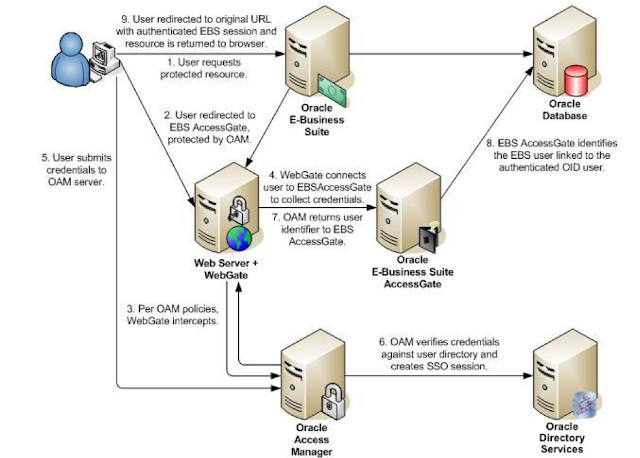
Oracle EBS integration with Oracle IDCS for SSO

Oracle EBS integration with Oracle IDCS for SSO Oracle EBS SSO? Why is it so important? Oracle E-Business Suite is a widely used application...