Thursday, July 06, 2017

R 12.2 : Difference between Oracle EBS R12.1.3 and Oracle EBS R12.2.4

Difference between Oracle EBS R12.1.3 and Oracle EBS R12.2.4


1)In R12.2 we have two kind of filesystems fs1(run filesystem) and fs2(patch filesystem) where as In R12.1.3 we only deal with one application filesystem.

2)In R12.2 we have the Application servers replaced by Weblogic server to manage the technology statck.
The 10.1.3 Home is replaced by FMW  (Fusion Middleware Home) i.e $FMW_HOME

The major change in R12.2 is involvement of Weblogic server to manager all the forms,oacore servers
where as in R12.1.3 we had the Application server 10.1.3 to manage the web home or Java Home

3)The  adpatch(patching) in R 12.1.3 is replaced by adop(online patching) in R 12.2.4

adop online patching utility doesn't require downtime. It involves minimal downtime during cutover phase where switching of filesystems happens. We can apply lot of patches and do cutover any time to minimize downtime

where as in  adpatch we just apply patch most of the times by bringing down applications or in hot patch mode.

4)'Apps' user Password change:
The 'apps' user password change involve 3 steps in R12.2.4
1)Change the password with FNDCPASS
2)Change the password in EBS Datasource from Weblogic admin console

Where as in R 12.1.3 It only involves 2 steps:
1)Change the password with FNDCPASS
2)Run Autoconfig
5)Log files locations:
All the oacore,forms log files are placed in $EBS_DOMAIN_HOME in R12.2. I will explain this in details in my upcoming posts.
Where as in R12.1.3 all the logs for oacore,forms are under $LOG_HOME/ora/10.1.3

12.2 : New features of Oracle Apps EBS 12.2

New features of Oracle Apps EBS 12.2

1.Online patching mechanism introduced, that allows to apply patches while the system is up and running, and the users are working as normal.

2. The AD Online Patching (adop) command-line utility is used to manage the Online Patching cycle.

3. Use of Oracle WebLogic Server instead of Oracle Containers for Java (OC4J).

4. An Oracle Fusion Middleware (FMW) ORACLE_HOME that supports Oracle
WebLogic Server (WLS) and supersedes the Java (OracleAS 10.1.3)
ORACLE_HOME that was used in previous releases.

5. Integration between Oracle Enterprise Manager 11g Fusion Middleware Control and Oracle Applications Manager to monitor EBS environments with Oracle WebLogic Server technology.

6.Integration with AutoVue Document Print Services to print file attachments.

7. Support for Mobile Safari on Apple iPads.

8.Enhanced Integrated SOA Gateway functionality for use with Oracle SOA Suite 11g and Oracle EBS Adapter.

9. Enhanced Workflow Worklist notification and management features.

10. Direct upgrade from EBS 11i (11.5.10.2), 12.0.4, 12.0.6, 12.1.1.12.1.2 & 12.1.3 to 12.2 is possible.

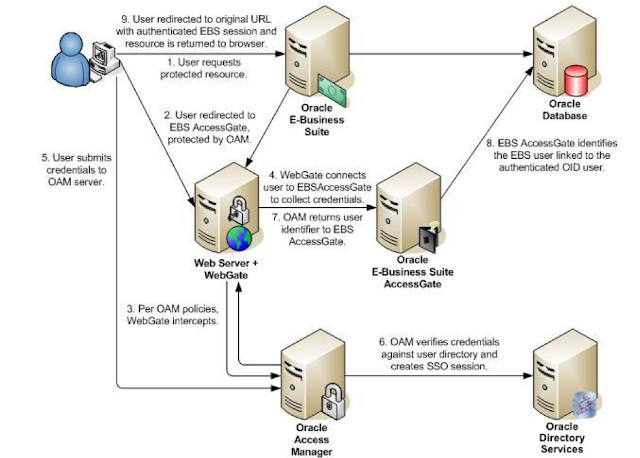
11. Oracle Single Sign-On is  replaced by Oracle Access Manager.

12. Oracle Portal replaced by Oracle WebCenter Portal.

12.2: The New Features and Benefits of the EBS 12.2 Upgrade

The New Features and Benefits of the EBS 12.2 Upgrade

New features of EBS 12.2
  1. Better GUI
The new Oracle EBS 12.2 offers a modern user experience with a new look and feel. It now has icon-based page navigation where users can select an icon to view a summarized list of recent notifications, and new user interactions that allow the end user to scroll through, detach a table, and work with a wider width. It also has new widgets that improve user productivity.
2. Online patching
Online patching allows the application of patches to an EBS 12.2 system while it is still up and running, greatly reducing patching downtime. Functionality leverages Oracle 11gR2 Edition-Based Redefinition features to support online patching, therefore allowing patching to be applied while the production system is fully operational.
3. WebLogic Server
WebLogic Server is the replacement for the Oracle Containers for Java (OC4J) application server used in EBS 12.0 and 12.1. WebLogic obtains data from the database making use of the context from the metadata dictionary (constructs HTML page) and then makes the HTML page available to the end user with the help of Apache (Listener). WebLogic is integrated with this tier planning to create hybrid applications using OAF-ADF and optimizing clustering performances.
4. Apps password change routine
There are some slight modifications to the apps password change routine in the E-Business Suite Release 12.2. These changes include extra options to change your password, along with some manual steps using FNDCPASS.
A new utility called AFPASSWD has been introduced. Unlike FNDCPASS, it requires no apps or system user passwords. This permits the separation of duties between the database administrator and the application administrator. Often both these roles are performed by the same DBA, but in large organizations there may be different teams managing Database and Application.
Benefits of the EBS 12.2 upgrade
1. Streamlined installation process
Users now have an option of installing the new EBS 12.2 on their existing database servers with the capability of carrying out installation into existing Real Application Clusters environments. Also, the use of native installation tools for Oracle Fusion Middleware and Oracle Database technology stack components has been streamlined.
2. Reduced patch downtime
Online patching enabled by edition-based redefinition of Oracle Database 11g has dramatically reduced patch downtime for Oracle E-business Suite. Users remain online while patches are applied. The user downtime in EBS 12.2 is minimized to a less cutover period with an anticipated maintenance window, enabling critical business operations and revenue-generating activities to continue during patching.
3. Support of Fusion Middleware by Oracle Apps 12.2 cloning
With the new support of Fusion Middleware by Oracle Apps 12.2 cloning, the upgrade to Oracle Fusion Middleware Release 12c (12.2.1) from previous versions of Oracle Fusion Middleware can now be made.
4. Microsoft Office 32 bit and 64 bit certified for Oracle web application
The following versions of Microsoft Office 32 bit and 64 bit are now certified with Oracle E-Business Suite Release 12.2: Office 2007 (till October 2017), Office 2010 (till October 2020), Office 2013 (till April 2023), and Office 2016.
5. High availability provided from online patching
High availability is ensured with online patching as users remain online during the patching process and user downtime is limited to system restart time. Critical business operations and revenue generating activities are not interrupted, as the maintenance window in EBS 12.2 is predictable.
6. Direct upgrade to EBS 12.2 from earlier EBS 11i releases
A direct upgrade path is available from EBS 11.5.10.2 to EBS 12.2. Also, EBS 11.5.10.2 users can upgrade directly to EBS 12.2. (no EBS 12 intermediate release required). All EBS 11.5.10.2 users are required to apply the minimum baseline patch for Extended Support as per the description in Patch Requirements for Extended Support of Oracle E-Business Suite Release 11.5.10 (Document 883202.1). Users of the earlier EBS 11i releases (such as 11.5.7) need to be at the 11.5.10.2 level (plus follow the minimum baseline patch requirements for Extended Support) before they can upgrade to EBS 12.2.
Source : https://www.datavail.com/blog/the-new-features-and-benefits-of-the-ebs-12-2-upgrade/

Saturday, March 04, 2017

RMAN Active Duplicate Script

Source: PRD1
Target: TST1

1. Add Tnsnames entries of PRD1 in TST1
2. Add Tnsnames entries of TST1 in PRD1
3. Make sure both the listeners are up on Source and Target
4. Create orapwd file in TST1

orapwd file=$ORACLE_HOME/dbs/TST1 password=manager entries=10

select * from v$pwfile_users;

5. Keep these paramters in TST1 pfile

*.db_file_name_convert='/data/app/PRD1/db/apps_st/data','/data/app/TST1/db/apps_st/data','/index/app/PRD1/db/apps_st/data','/index/app/TST1/db/apps_st/data'
*.log_file_name_convert='/redo/app/PRD1/db/apps_st/data','/redo/app/TST1/db/apps_st/data'

6. Connect to TST1
   startup nomount

vi TST1_active_dup_db.sh

$ORACLE_HOME/bin/rman nocatalog log=TST1_active_dup_db.log <<EOF
connect target sys/manager@PRD1
connect auxiliary sys/manager@TST1
duplicate target database to TST1 from active database nofilenamecheck;
EOF

nohup sh TST1_active_dup_db.sh &

RMAN Validate Script

rman target /

RMAN> spool log to validate_rman.txt
RMAN> BACKUP VALIDATE CHECK LOGICAL  DATABASE ARCHIVELOG ALL;

SQL> select name from v$database;

NAME
---------
SPROD

SQL> select * from v$database_block_corruption;

no rows selected

RMAN Backup Details

col STATUS format a9
col hrs format 999.99
select
SESSION_KEY, INPUT_TYPE, STATUS,
to_char(START_TIME,'mm/dd/yy hh24:mi') start_time,
to_char(END_TIME,'mm/dd/yy hh24:mi')   end_time,
elapsed_seconds/3600                   hrs
from V$RMAN_BACKUP_JOB_DETAILS
order by session_key;


select object_type,OUTPUT_DEVICE_TYPE,OPERATION,STATUS,START_TIME,END_TIME,OUTPUT_BYTES/1024/1024/1024 as Backup_SIZE_GB
from v$rman_status
 where OBJECT_TYPE is not null and START_TIME > sysdate -2
order by START_TIME;

RMAN Backup Monitor/Progress scripts

REM RMAN Progress
set lines 120
set pagesize 200
alter session set nls_date_format='dd/mm/yy hh24:mi:ss';
select SID, START_TIME,TOTALWORK, sofar, (sofar/totalwork) * 100 done,
sysdate + TIME_REMAINING/3600/24 end_at
from v$session_longops
where totalwork > sofar
AND opname NOT LIKE '%aggregate%'
AND opname like 'RMAN%'
/

REM RMAN Progress
set lines 200
set pagesize 200
alter session set nls_date_format='dd/mm/yy hh24:mi:ss';
select inst_id,sid,start_time,opname, round((sofar/totalwork)*100) "% Completed",sysdate + time_remaining/3600/24 will_end_at from gv$session_longops where totalwork > sofar and opname not like '%aggregate%' and opname like 'RMAN%' order by 1;

REM RMAN waits
set lines 200
column sid format 9999
column spid format 99999
column client_info format a25
column event format a30
column secs format 9999
SELECT SID, SPID, CLIENT_INFO, event, seconds_in_wait secs, p1, p2, p3
  FROM V$PROCESS p, V$SESSION s
  WHERE p.ADDR = s.PADDR
  and CLIENT_INFO like 'rman channel=%'
/

Oracle EBS integration with Oracle IDCS for SSO

Oracle EBS integration with Oracle IDCS for SSO Oracle EBS SSO? Why is it so important? Oracle E-Business Suite is a widely used application...