1. How do you delete 3 days old log files?
Usage: find /location -name "*.log" -mtime +3 -exec rm -rf{} \;
Example : find ./ -name "*.req" -mtime +4 -exec ls -ltr {} \;
2. Display latest 20 largest files/directories in current directory?
Solution: du -ka sort -n tail -20
3. How do you display/remove Specifice Month files in Unix?
Solution: rm `ls -l grep Jun awk '{print $9}'`
4. How do you find the files which contains a specific Word?
Solution : find /home/ganesh \( -type f \) -exec grep -l test {} \;
Wednesday, September 03, 2008

Patching Issues
Patching Issues/Sollutions/WorkArounds
During Patching, If you get different AD Worker Errors:
1. AD Worker error:
The following ORACLE error:
occurred while executing the SQL statement:
GRANT select on GV$LOGFILE to em_oam_monitor_role
Error occurred in file
/appltop/apps/ad/11.5.0/patch/115/sql/ademusr.sql
Work Around:
->connect DB / as sysdba
->grant select on GV_$LOGFILE to system with grant option.
->connect system/systempwd.
->grant select on GV$LOGFILE to em_oam_monitor_role.
-> Restart the failed worker using adctrl.
2.AD Worker error:
The following ORACLE error:ORA-12801: error signaled in parallel query server P000ORA-01452: cannot CREATE UNIQUE INDEX; duplicate keys foundoccurred while executing the SQL statement:CREATE UNIQUE INDEX ICX.ICX_TRANSACTIONS_U1 ON ICX.ICX_TRANSACTIONS(TRANSACTION_ID) LOGGING STORAGE (INITIAL 4K NEXT 104K MINEXTENTS 1MAXEXTENTS UNLIMITED PCTINCREASE 0 FREELIST GROUPS 4 FREELISTS 4 ) PCTFREE10 INITRANS 11 MAXTRANS 255 COMPUTE STATISTICS PARALLEL TABLESPACE ICXXAD Worker error:Unable to compare or correct tables or indexes or keysbecause of the error above
Work Around
->Execute the following SQL to prevent errors during Patch Application through adpatch:
->SELECT TRANSACTION_ID, count(*)FROM ICX.ICX_TRANSACTIONSGROUP BY TRANSACTION_IDHAVING count(*)>1
->If the Above query returns any Row then Please execute the following SQL :
->$ICX_TOP/sql (named ICXDLTMP.sql).
During Patching, If you get different AD Worker Errors:
1. AD Worker error:
The following ORACLE error:
occurred while executing the SQL statement:
GRANT select on GV$LOGFILE to em_oam_monitor_role
Error occurred in file
/appltop/apps/ad/11.5.0/patch/115/sql/ademusr.sql
Work Around:
->connect DB / as sysdba
->grant select on GV_$LOGFILE to system with grant option.
->connect system/systempwd.
->grant select on GV$LOGFILE to em_oam_monitor_role.
-> Restart the failed worker using adctrl.
2.AD Worker error:
The following ORACLE error:ORA-12801: error signaled in parallel query server P000ORA-01452: cannot CREATE UNIQUE INDEX; duplicate keys foundoccurred while executing the SQL statement:CREATE UNIQUE INDEX ICX.ICX_TRANSACTIONS_U1 ON ICX.ICX_TRANSACTIONS(TRANSACTION_ID) LOGGING STORAGE (INITIAL 4K NEXT 104K MINEXTENTS 1MAXEXTENTS UNLIMITED PCTINCREASE 0 FREELIST GROUPS 4 FREELISTS 4 ) PCTFREE10 INITRANS 11 MAXTRANS 255 COMPUTE STATISTICS PARALLEL TABLESPACE ICXXAD Worker error:Unable to compare or correct tables or indexes or keysbecause of the error above
Work Around
->Execute the following SQL to prevent errors during Patch Application through adpatch:
->SELECT TRANSACTION_ID, count(*)FROM ICX.ICX_TRANSACTIONSGROUP BY TRANSACTION_IDHAVING count(*)>1
->If the Above query returns any Row then Please execute the following SQL :
->$ICX_TOP/sql (named ICXDLTMP.sql).
Apps DBA - Tracing
Oracle Apps DBA - Enable Trace Application level
1. How do you enable/disable a trace to a Oracle Application Forms Session?
solution:
1. Connection to Oracle Applications
2. Navigate to the particular form, which you want trace to be enabled
3. Goto Menu Help->Diagnostics->Trace->Regular Trace and select it
4. It will ask you for Apps Password. Provide it
5. Then it will show the file path where trace is going to be generated
6. Ask developer to perform their transactions, once they are done disable the trace
7. Goto to that location to get the trace file
8. Get the trace out put file using tkprof with different options
To disable Trace Session
Goto Menu Help-> Diagnostics->Trace->No Trace
2. How do you enable/disable a trace to a Oracle Application Forms Session? (Other Way)
Solution:
1. Get the serial #, sid of particular form session by navigating Help->about Oracle applicatins
2. Connect to database using sqlplus with relavant user
3. execute dbms_system.set_sql_trace_in_session(2122,332,TRUE);
4. Select spid from v$process where addr=(select paddr from v$session where sid=2122);
5. You will get spid like 4515 for above statement
6. Goto udump location and type ls -ltr *4515* you will get trace file
To disable Trace Session
1. execute dbms_system.set_sql_trace_in_session(2122,332,FALSE);
3. How do you enable/disable a trace to a Concurrent Program?
Solution:
1. Connect to Oracle Applications
2. Navigate to System Administrator->Concurrent->Program->Define
3. Query the concurrent program on which you want to enable trace.
4. Check the enable trace check box bottom of the screen, Save it.
5. Ask the developer to submit the request, Once the request got submitted and completed normal.
6. Get the spid as select oracle_process_id from apps.fnd_concurrent_requests where request_id=456624.
7. You will get a spid like 12340.
8. Goto Udump and ls -ltr *12344*.
9 . You will get trace file.
1. How do you enable/disable a trace to a Oracle Application Forms Session?
solution:
1. Connection to Oracle Applications
2. Navigate to the particular form, which you want trace to be enabled
3. Goto Menu Help->Diagnostics->Trace->Regular Trace and select it
4. It will ask you for Apps Password. Provide it
5. Then it will show the file path where trace is going to be generated
6. Ask developer to perform their transactions, once they are done disable the trace
7. Goto to that location to get the trace file
8. Get the trace out put file using tkprof with different options
To disable Trace Session
Goto Menu Help-> Diagnostics->Trace->No Trace
2. How do you enable/disable a trace to a Oracle Application Forms Session? (Other Way)
Solution:
1. Get the serial #, sid of particular form session by navigating Help->about Oracle applicatins
2. Connect to database using sqlplus with relavant user
3. execute dbms_system.set_sql_trace_in_session(2122,332,TRUE);
4. Select spid from v$process where addr=(select paddr from v$session where sid=2122);
5. You will get spid like 4515 for above statement
6. Goto udump location and type ls -ltr *4515* you will get trace file
To disable Trace Session
1. execute dbms_system.set_sql_trace_in_session(2122,332,FALSE);
3. How do you enable/disable a trace to a Concurrent Program?
Solution:
1. Connect to Oracle Applications
2. Navigate to System Administrator->Concurrent->Program->Define
3. Query the concurrent program on which you want to enable trace.
4. Check the enable trace check box bottom of the screen, Save it.
5. Ask the developer to submit the request, Once the request got submitted and completed normal.
6. Get the spid as select oracle_process_id from apps.fnd_concurrent_requests where request_id=456624.
7. You will get a spid like 12340.
8. Goto Udump and ls -ltr *12344*.
9 . You will get trace file.
Oracle Apps DBA - Concurrent Managers
Oracle Apps DBA - Concurrent Managers
1. How do you start/stop/check Concurrent Managers?
Solution:
cd $COMMON_TOP/admin/scripts/context_name/
-> adcmctl.sh start apps/appspwd
-> adcmctl.sh stop apps/appspwd
-> adcmctl.sh status apps/appspwd
-> ps -ef grep FNDLIBR grep applmgr
2. How do you create custom concurrent manager?
Solution:
1. Login to System Administrator Responsibility
2. Navigate to Concurrent > Manager > Define
Manager Field: Custom Manager-
Short Name: CUSTOMCM-
Type: Concurrent Manager-
Program Library: FNDLIBR-
Enter desired Cache-
Work Shifts: Standard-
Enter number of Processes-
Provide Specialization Rules- Save
3. Navigate to Concurrent > Manager > Administer- Activate the Custom Manager
3. How to Start the Concurrent Manager from the Operating system?
solution:
startmgr [parameters]
Example: startmgr sysmgr="applsys/fnd" mgrname="std" printer="hqseq1"mailto="jsmith" restart="N" logfile="mgrlog" sleep="90" pmon="5" quesiz="10"
Parameters:
[sysmgr="fnd_usernamd/fnd_password"] [mgrname="mgrname"]
[printer=printer]
[mailto="userid1 userid2...]
[restart="Nminutes"]
[logfile="log_file_name"]
[sleep="new_check"]
[pmon="manager_check"]
[quesiz="number_check"]
[diag="YN"]
4. EachConcurrent Request Phase and Status Meaning?
Solution:
Phase Status Description
PENDING Normal Request is waiting for the next available manager.
PENDING Standby Program to run request is incompatible with other program(s) currently running.
PENDING Scheduled Request is scheduled to start at a future time or date.
PENDING Waiting A child request is waiting for its Parent request to mark it ready to run. For example, a request in a request set that runs sequentially must wait for a prior request to complete.
RUNNING Normal Request is running normally.
RUNNING Paused Parent request pauses for all its child requests to finish running. For example, a request set pauses for all requests in the set to complete.
RUNNING Resuming All requests submitted by the same parent request have completed running. The Parent request resumes running.
RUNNING Terminating Request is terminated by choosing the Cancel Request button in Requests window.
COMPLETED Normal Request completed successfully.
COMPLETED Error Request failed to complete successfully.
COMPLETED Warning Request completed with warnings. For example, a request is generated successfully but fails to print.
COMPLETED Cancelled Pending or Inactive request is cancelled by choosing the Cancel Request button in the Requests window.
COMPLETED Terminated Request is terminated by choosing the Cancel Request button in the Requests window.
INACTIVE Disabled Program to run request is not enabled. Contact your system administrator.
INACTIVE On Hold Pending request is placed on hold by choosing the Hold Request button in the Requests window.
INACTIVE No Manager No manager is defined to run the request. Check with your system administrator. A status of No Manager is also given when all managers are locked by run-alone requests.
1. How do you start/stop/check Concurrent Managers?
Solution:
cd $COMMON_TOP/admin/scripts/context_name/
-> adcmctl.sh start apps/appspwd
-> adcmctl.sh stop apps/appspwd
-> adcmctl.sh status apps/appspwd
-> ps -ef grep FNDLIBR grep applmgr
2. How do you create custom concurrent manager?
Solution:
1. Login to System Administrator Responsibility
2. Navigate to Concurrent > Manager > Define
Manager Field: Custom Manager-
Short Name: CUSTOMCM-
Type: Concurrent Manager-
Program Library: FNDLIBR-
Enter desired Cache-
Work Shifts: Standard-
Enter number of Processes-
Provide Specialization Rules- Save
3. Navigate to Concurrent > Manager > Administer- Activate the Custom Manager
3. How to Start the Concurrent Manager from the Operating system?
solution:
startmgr [parameters]
Example: startmgr sysmgr="applsys/fnd" mgrname="std" printer="hqseq1"mailto="jsmith" restart="N" logfile="mgrlog" sleep="90" pmon="5" quesiz="10"
Parameters:
[sysmgr="fnd_usernamd/fnd_password"] [mgrname="mgrname"]
[printer=printer]
[mailto="userid1 userid2...]
[restart="Nminutes"]
[logfile="log_file_name"]
[sleep="new_check"]
[pmon="manager_check"]
[quesiz="number_check"]
[diag="YN"]
4. EachConcurrent Request Phase and Status Meaning?
Solution:
Phase Status Description
PENDING Normal Request is waiting for the next available manager.
PENDING Standby Program to run request is incompatible with other program(s) currently running.
PENDING Scheduled Request is scheduled to start at a future time or date.
PENDING Waiting A child request is waiting for its Parent request to mark it ready to run. For example, a request in a request set that runs sequentially must wait for a prior request to complete.
RUNNING Normal Request is running normally.
RUNNING Paused Parent request pauses for all its child requests to finish running. For example, a request set pauses for all requests in the set to complete.
RUNNING Resuming All requests submitted by the same parent request have completed running. The Parent request resumes running.
RUNNING Terminating Request is terminated by choosing the Cancel Request button in Requests window.
COMPLETED Normal Request completed successfully.
COMPLETED Error Request failed to complete successfully.
COMPLETED Warning Request completed with warnings. For example, a request is generated successfully but fails to print.
COMPLETED Cancelled Pending or Inactive request is cancelled by choosing the Cancel Request button in the Requests window.
COMPLETED Terminated Request is terminated by choosing the Cancel Request button in the Requests window.
INACTIVE Disabled Program to run request is not enabled. Contact your system administrator.
INACTIVE On Hold Pending request is placed on hold by choosing the Hold Request button in the Requests window.
INACTIVE No Manager No manager is defined to run the request. Check with your system administrator. A status of No Manager is also given when all managers are locked by run-alone requests.
Oracle DBA -Performance Tuning Questions
Oracle DBA - Performance Tuning Interview Questions
1. What is Performance Tuning?
Ans: Making optimal use of system using existing resources called performace tuning.
2. Types of Tunings?
Ans: 1. CPU Tuning 2. Memory Tuning 3. IO Tuning 4. Application Tuning 5. Databse Tuning
3. What Mailny Database Tuning contains?
Ans: 1. Hit Ratios 2. Wait Events
3. What is an optimizer?
Ans: Optimizer is a mechanizm which will make the execution plan of an sql statement
4. Types of Optimizers?
Ans: 1. RBO(Rule Based Optimizer) 2. CBO(Cost Based Optimzer)
5. Which init parameter is used to make use of Optimizer?
Ans: optimizer_mode= rule----RBO cost---CBO choose--------First CBO otherwiser RBO
6. Which optimizer is the best one?
Ans: CBO
7. What are the pre requsited to make use of Optimizer?
Ans: 1. Set the optimizer mode 2. Collect the statistics of an object
8. How do you collect statistics of a table?
Ans: analyze table emp compute statistics or analyze table emp estimate statistics
9. What is the diff between compute and estimate?
Ans: If you use compute, The FTS will happen, if you use estimate just 10% of the table will be read
10. What wll happen if you set the optimizer_mode=choose?Ans: If the statistics of an object is available then CBO used. if not RBO will be used
11. Data Dictionay follows which optimzer mode?
Ans: RBO
12. How do you delete statistics of an object?
Ans: analyze table emp delete statistics
13. How do you collect statistics of a user/schema?
Ans: exec dbms_stats.gather_schema_stats(scott)
14. How do you see the statistics of a table?
Ans: select num_rows,blocks,empty_blocks from dba_tables where tab_name='emp'
15. What are chained rows?
Ans: These are rows, it spans in multiple blocks
16. How do you collect statistics of a user in Oracle Apps?
Ans: fnd_stats package
17. How do you create a execution plan and how do you see?Ans: 1. @?/rdbms/admin/utlxplan.sql --------- it creates a plan_table 2. explain set statement_id='1' for select * from emp; 3. @?/rdbms/admin/utlxpls.sql -------------it display the plan
18. How do you know what sql is currently being used by the session?
Ans: by goind v$sql and v$sql_area
19. What is a execution plan?
Ans: Its a road map how sql is being executed by oracle db?
20. How do you get the index of a table and on which column the index is?
Ans: dba_indexes and dba_ind_columns
21. Which init paramter you have to set to by pass parsing?
Ans: cursor_sharing=force
22. How do you know which session is running long jobs?
Ans: by going v$session_longops
23. How do you flush the shared pool?
Ans: alter system flush shared_pool
24. How do you get the info about FTS?
Ans: using v$sysstat
25. How do you increase the db cache?
Ans: alter table emp cache
26. Where do you get the info of library cache?
Ans: v$librarycache
27. How do you get the information of specific session?
Ans: v$mystat
28. How do you see the trace files?
Ans: using tkprof --- usage: tkprof allllle.trc llkld.txt
29. Types of hits?
Ans: Buffer hit and library hit
30. Types of wait events?
Ans: cpu time and direct path read
1. What is Performance Tuning?
Ans: Making optimal use of system using existing resources called performace tuning.
2. Types of Tunings?
Ans: 1. CPU Tuning 2. Memory Tuning 3. IO Tuning 4. Application Tuning 5. Databse Tuning
3. What Mailny Database Tuning contains?
Ans: 1. Hit Ratios 2. Wait Events
3. What is an optimizer?
Ans: Optimizer is a mechanizm which will make the execution plan of an sql statement
4. Types of Optimizers?
Ans: 1. RBO(Rule Based Optimizer) 2. CBO(Cost Based Optimzer)
5. Which init parameter is used to make use of Optimizer?
Ans: optimizer_mode= rule----RBO cost---CBO choose--------First CBO otherwiser RBO
6. Which optimizer is the best one?
Ans: CBO
7. What are the pre requsited to make use of Optimizer?
Ans: 1. Set the optimizer mode 2. Collect the statistics of an object
8. How do you collect statistics of a table?
Ans: analyze table emp compute statistics or analyze table emp estimate statistics
9. What is the diff between compute and estimate?
Ans: If you use compute, The FTS will happen, if you use estimate just 10% of the table will be read
10. What wll happen if you set the optimizer_mode=choose?Ans: If the statistics of an object is available then CBO used. if not RBO will be used
11. Data Dictionay follows which optimzer mode?
Ans: RBO
12. How do you delete statistics of an object?
Ans: analyze table emp delete statistics
13. How do you collect statistics of a user/schema?
Ans: exec dbms_stats.gather_schema_stats(scott)
14. How do you see the statistics of a table?
Ans: select num_rows,blocks,empty_blocks from dba_tables where tab_name='emp'
15. What are chained rows?
Ans: These are rows, it spans in multiple blocks
16. How do you collect statistics of a user in Oracle Apps?
Ans: fnd_stats package
17. How do you create a execution plan and how do you see?Ans: 1. @?/rdbms/admin/utlxplan.sql --------- it creates a plan_table 2. explain set statement_id='1' for select * from emp; 3. @?/rdbms/admin/utlxpls.sql -------------it display the plan
18. How do you know what sql is currently being used by the session?
Ans: by goind v$sql and v$sql_area
19. What is a execution plan?
Ans: Its a road map how sql is being executed by oracle db?
20. How do you get the index of a table and on which column the index is?
Ans: dba_indexes and dba_ind_columns
21. Which init paramter you have to set to by pass parsing?
Ans: cursor_sharing=force
22. How do you know which session is running long jobs?
Ans: by going v$session_longops
23. How do you flush the shared pool?
Ans: alter system flush shared_pool
24. How do you get the info about FTS?
Ans: using v$sysstat
25. How do you increase the db cache?
Ans: alter table emp cache
26. Where do you get the info of library cache?
Ans: v$librarycache
27. How do you get the information of specific session?
Ans: v$mystat
28. How do you see the trace files?
Ans: using tkprof --- usage: tkprof allllle.trc llkld.txt
29. Types of hits?
Ans: Buffer hit and library hit
30. Types of wait events?
Ans: cpu time and direct path read
Oracle DBA - Interview Questions
Oracle DBA - Interview Questions
1. How do you kill a session from the database?
Ans: alter system kill 'sid,serial#'
Usage : alter system kill '9,8' (Get the info from v$session
2. How do you know whether the process is Server Side Process?
Ans. By seeing the process in ps-ef as oracle+sid
eg: suppose the sid is prod, then the server process is refered as server side process and local=no
3. Daily Activities of a Oracle DBA?
Ans: 1. Check the Databse availability
2. Check the Listerner availability
3. check the alert log filie for errors
4. monitoring space availablilty in tablespaces
5. monitoring mount point (see capacity planning document)
6. Validate Database backup or Archive backup
7. Find objects which is going to reach max extents
8. Database Health check
9. CPU, Processor, Memory usage
4. Where do you get all hidden parameters ?
Ans: In the table x$ksppi
5. How do you see the names from that table?
Ans:select ksppinm,ksppdesc from x$ksppi where substr(ksppinm,1,1)='_'
6. How do increase the count of datafiles?
Ans: Generate the control file syntax from the existing control file and recreate the control file by changing the parameter MAXDATAFILES = yourdesired size
Procedure:
1. open the database
2. Generate the control file change the maxdatafiles
3. open the db in nomount
4. execute the syntax with noresetlogs
5. alter databse open
7. What is the init parameter to make use of profile?
Ans: resource_limits=true
8. How do you know whether the parameter is dynamic or static?
Ans: By going v$parameter and check the fields isses_modifiable and issys_modifible
9. What is the package and procedure name to conver dmt to lmt and vice versa?
Ans: exec dbms_space_admin.tablespace_migrate_from_local("gtb")
exec dbms_space_admin.tablespace_migrate_to_local("gtb1")
10. What is the use of nohup?
Ans: The execution of a specific task is performed in the server side with out any interupting
Usage : nohup cp -r * /tmp/. &
11. Where alert log is stored? What is the parameter?
Ans: in bdump. parameter is background_dump_dest
11. Where trace file are stored? What is the parameter?
Ans: in udump. parameter is user_dump_dest
12. Common Oracle Errors ……
1) ORA-01555 : Snapshot Too Old
2) ORA-01109 : Database Not Mounted
3) ORA-01507 : Database Not Open
4) ORA-01801 : Database already In startup mode.
5) ORA-600 : Internal error code for oracle program
Usage : oerr ORA 600
13. How do you enable traceing while you are in the database?
Ans : alter session set sql_trace=true;
14. If you want to enable tracing in remote system? what will u do?
Ans: exec dbms_system.SET_SQL_TRACE_IN_SESSION(9,3,TRUE);
15. Which role you grant to rman user while configuring rman user
Ans: recover_catalog_owner
16. Where do you get to know the version of your oracle software and what is your version?
Ans: from v$version(field is banner) and the version is 9.2.0.1.0
17. What is the parameters to set in the init.ora if you create db using OMF(Oracle Managed Files)?
Ans: db_create_file_dest=
db_create_online_log_dest_1=
18. What is a runaway session?
Ans: you killed a session in the database but it still remains in the os level and vice versa. Its called runaway session. If runaway session is there cpu consumes more usage.
19. How do you know whether the specific tablespace is in begin backup mode?
Ans: select status from v$backup. if it is active it means it is in begin backup mode
20. If you want to maintain one more archive destination which parameter you have to set ?
Ans:Its a dynamic parameter you have to set log_archive_duplex_dest=
Usage : alter system set log_archive_duplex_dest=
21. How do you know the create syntax of your function/procedure/index/synonym ?
Ans: using function dbms_metadata.get_ddl(object type,object name,owner)
22. What is the password you have to set in the init.ora to enable remote login ?
Ans: remote_login_password_file=exclusive
23.How do u set crontab to delete 5 days old trace files at daily 10'0 clock?
Ans: crontab -e
0 10 * * * /usr/bin/find /u001/admin/udump -name "*.trc" -mtime +5 -exec rm -rf {} \;
save and exit (wq!)
24.How do u know when system was last booted?
Ans: 3 ways 1.uptime cmd
2.top
3.who -b
4.w
24.How do u know load on system?
Ans: 1.w
2.top
25. How do you know when the process is started
Ans : Using ps -ef grep process name
26. Tell me the location of Unix/Solaris log messages stored?
Ans:/var/log/messages(Unix)
/var/adm/messages (solaris)
27.How do you take backup of a controlfile?
Ans: alter database backup controlfille to destination (Database should be open)
file will be save in the your destination
28. What is the parameter to set the user trace enabiling?
Ans: sql_trace = true
29. How do you know whether archive log mode is enable or not?
Ans: issue command 'archive log list' at sqlplus prompt
30. Where do you get the information of quotas?
Ans: dba_ts_quotas view
31. How do you know how much archives are generated ?
Ans: using the view v$log_history
32. What is a stale?
Ans: The redolog file which has not been used yet
33. How do you read the binary file?
Ans: using strings -a
usage : strings -a filename
34.How do you read control file?
Ans: using command tkprof
Usage: tkprof contrl.ctl ctrol2.txt
35. How do you send the data to tape?
Ans: using 1. tar -cvf or 2. cpio
36. How do you connect to db and startup and shutdown the db without having dba group?
Ans: using remote_login_passwordfile
37. When will you take Cold back up especially?
Ans: during upgradation and migration
38. How do you enable/disable debugging mode in unix?
Ans: set -x and set +x
39. How do you get the create syntax of a table or index or function or procedure?
Ans: select dbms_metadata.get_ddl('TABLE','EMP','SCOTT') from dual;
40. How do you replace a string in vi editor?
Ans: %s/name/newname
41. When ckpt occurs?
Ans: 1. for every 3 seconds
2. when 1/3rd of DB buffer fills
3. when log swtich occurs
4. when databse shuts down
42. In which file oracle inventory information is available?
Ans : /etc/oraInst.loc
42. Where all oracle homes and oracle sid information available?
Ans: /etc/oratab
43. What is the environment variable to set the location of the listener.ora
Ans: TNS_ADMIN
44. How do you know whether listener is running or not
Ans: ps -ef grep tns
45. What are the two steps involved in instace recovery?
Ans: 1. Roll forward (redofiles data to datafiles)
2. Roll backward (undo files to datafiles).
46. If you delete the alert log fle what will happen?
Ans: New alert log will be created automatically
57. How do you create a table in another tablespace name?
Ans: create table xyz (a number) tablespace system
58. What are the modes/options in incomplete recovery?
Ans: cancel based, change based, time based
59. How do you create an alias?
Ans: alias bdump='cd $ORACLE_HOME/rdbms/admin'
60. Types of trace files?
Ans: 1. trace files generated by database (bdump)
2. trace files generated by user(udump)
61. How do you find the files whose are more than 500k?
Ans : fnd . -name "*" -size +500k
62. Where do you configure your hostname in linux?
Ans: vi /etc/hosts
63. What are the types of segments?
Ans: Data Segment,Undo Segment,Temporary segment,Index Segment
64. What is a synonym and different types of synonyms?
Ans: A synonym is an alias for a table,view, sequence or program unit.
1. Public synonym
2. private synonym
65. What are mandatory background processes in Oracle Database?
Ans: smon,pmon,ckpt,dbwr,lgwr
66. How do you make your redolog group inactive?
Ans: alter system switch logfile;
67. How do you drop a tablespace?
Ans: drop tablespace ts1 including contents and datafiles;
68. What is the parameter allows you to create max no. of groups?
Ans: maxlogfiles=
69. What is the paramter allows to create max no. of members in a group?
Ans: maxlognumbers=
70. What Controlfile contains?
Ans: Database name
Database creation time stamp
Address of datafiles and redolog files
Check point information
SCN information
71. What are the init parameters you have to set to make use of undo management?
Ans: undo_tablespace= undotbs1
undo_management= auto
undo_retention= time in minutes
comment rollback_segment
73. How do you enable monitoring of a table?
Ans: alter table tablename monitoring
74. How do you disable monitoring of a table?
Ans: alter table tablename no monitoring
75. How do you check the status of the table whether monitoring or not?
Ans: select table_name, monitoring from dba_table where owner='scott;
76. In which table records of monitoirg will be stored?
Ans: dba_tab_modificaitons
77. How do you get you demo files get created in your user?
Ans: ?/sqlplus/demo/demobld.sql execute this script on which user you want
78. What is netstat? and its Usage?
Ans: it is a utility to know the port numbers availability. Usage: netstat -na grep port number
79.How do you make use of stats pack?
Ans: 1. spcreate.sql (?/rdbms/admin/) -- to create statspack
2. execute statspack.snap -- to collect datbase snaps
3. spreport.sql-- to generate reports(in your current directory)
4. spauto.sql----to schedule a job
5. sppurge.sql---to delete statistics
6. spdrop.sql----to drop the statistics
1. How do you kill a session from the database?
Ans: alter system kill 'sid,serial#'
Usage : alter system kill '9,8' (Get the info from v$session
2. How do you know whether the process is Server Side Process?
Ans. By seeing the process in ps-ef as oracle+sid
eg: suppose the sid is prod, then the server process is refered as server side process and local=no
3. Daily Activities of a Oracle DBA?
Ans: 1. Check the Databse availability
2. Check the Listerner availability
3. check the alert log filie for errors
4. monitoring space availablilty in tablespaces
5. monitoring mount point (see capacity planning document)
6. Validate Database backup or Archive backup
7. Find objects which is going to reach max extents
8. Database Health check
9. CPU, Processor, Memory usage
4. Where do you get all hidden parameters ?
Ans: In the table x$ksppi
5. How do you see the names from that table?
Ans:select ksppinm,ksppdesc from x$ksppi where substr(ksppinm,1,1)='_'
6. How do increase the count of datafiles?
Ans: Generate the control file syntax from the existing control file and recreate the control file by changing the parameter MAXDATAFILES = yourdesired size
Procedure:
1. open the database
2. Generate the control file change the maxdatafiles
3. open the db in nomount
4. execute the syntax with noresetlogs
5. alter databse open
7. What is the init parameter to make use of profile?
Ans: resource_limits=true
8. How do you know whether the parameter is dynamic or static?
Ans: By going v$parameter and check the fields isses_modifiable and issys_modifible
9. What is the package and procedure name to conver dmt to lmt and vice versa?
Ans: exec dbms_space_admin.tablespace_migrate_from_local("gtb")
exec dbms_space_admin.tablespace_migrate_to_local("gtb1")
10. What is the use of nohup?
Ans: The execution of a specific task is performed in the server side with out any interupting
Usage : nohup cp -r * /tmp/. &
11. Where alert log is stored? What is the parameter?
Ans: in bdump. parameter is background_dump_dest
11. Where trace file are stored? What is the parameter?
Ans: in udump. parameter is user_dump_dest
12. Common Oracle Errors ……
1) ORA-01555 : Snapshot Too Old
2) ORA-01109 : Database Not Mounted
3) ORA-01507 : Database Not Open
4) ORA-01801 : Database already In startup mode.
5) ORA-600 : Internal error code for oracle program
Usage : oerr ORA 600
13. How do you enable traceing while you are in the database?
Ans : alter session set sql_trace=true;
14. If you want to enable tracing in remote system? what will u do?
Ans: exec dbms_system.SET_SQL_TRACE_IN_SESSION(9,3,TRUE);
15. Which role you grant to rman user while configuring rman user
Ans: recover_catalog_owner
16. Where do you get to know the version of your oracle software and what is your version?
Ans: from v$version(field is banner) and the version is 9.2.0.1.0
17. What is the parameters to set in the init.ora if you create db using OMF(Oracle Managed Files)?
Ans: db_create_file_dest=
db_create_online_log_dest_1=
18. What is a runaway session?
Ans: you killed a session in the database but it still remains in the os level and vice versa. Its called runaway session. If runaway session is there cpu consumes more usage.
19. How do you know whether the specific tablespace is in begin backup mode?
Ans: select status from v$backup. if it is active it means it is in begin backup mode
20. If you want to maintain one more archive destination which parameter you have to set ?
Ans:Its a dynamic parameter you have to set log_archive_duplex_dest=
Usage : alter system set log_archive_duplex_dest=
21. How do you know the create syntax of your function/procedure/index/synonym ?
Ans: using function dbms_metadata.get_ddl(object type,object name,owner)
22. What is the password you have to set in the init.ora to enable remote login ?
Ans: remote_login_password_file=exclusive
23.How do u set crontab to delete 5 days old trace files at daily 10'0 clock?
Ans: crontab -e
0 10 * * * /usr/bin/find /u001/admin/udump -name "*.trc" -mtime +5 -exec rm -rf {} \;
save and exit (wq!)
24.How do u know when system was last booted?
Ans: 3 ways 1.uptime cmd
2.top
3.who -b
4.w
24.How do u know load on system?
Ans: 1.w
2.top
25. How do you know when the process is started
Ans : Using ps -ef grep process name
26. Tell me the location of Unix/Solaris log messages stored?
Ans:/var/log/messages(Unix)
/var/adm/messages (solaris)
27.How do you take backup of a controlfile?
Ans: alter database backup controlfille to destination (Database should be open)
file will be save in the your destination
28. What is the parameter to set the user trace enabiling?
Ans: sql_trace = true
29. How do you know whether archive log mode is enable or not?
Ans: issue command 'archive log list' at sqlplus prompt
30. Where do you get the information of quotas?
Ans: dba_ts_quotas view
31. How do you know how much archives are generated ?
Ans: using the view v$log_history
32. What is a stale?
Ans: The redolog file which has not been used yet
33. How do you read the binary file?
Ans: using strings -a
usage : strings -a filename
34.How do you read control file?
Ans: using command tkprof
Usage: tkprof contrl.ctl ctrol2.txt
35. How do you send the data to tape?
Ans: using 1. tar -cvf or 2. cpio
36. How do you connect to db and startup and shutdown the db without having dba group?
Ans: using remote_login_passwordfile
37. When will you take Cold back up especially?
Ans: during upgradation and migration
38. How do you enable/disable debugging mode in unix?
Ans: set -x and set +x
39. How do you get the create syntax of a table or index or function or procedure?
Ans: select dbms_metadata.get_ddl('TABLE','EMP','SCOTT') from dual;
40. How do you replace a string in vi editor?
Ans: %s/name/newname
41. When ckpt occurs?
Ans: 1. for every 3 seconds
2. when 1/3rd of DB buffer fills
3. when log swtich occurs
4. when databse shuts down
42. In which file oracle inventory information is available?
Ans : /etc/oraInst.loc
42. Where all oracle homes and oracle sid information available?
Ans: /etc/oratab
43. What is the environment variable to set the location of the listener.ora
Ans: TNS_ADMIN
44. How do you know whether listener is running or not
Ans: ps -ef grep tns
45. What are the two steps involved in instace recovery?
Ans: 1. Roll forward (redofiles data to datafiles)
2. Roll backward (undo files to datafiles).
46. If you delete the alert log fle what will happen?
Ans: New alert log will be created automatically
57. How do you create a table in another tablespace name?
Ans: create table xyz (a number) tablespace system
58. What are the modes/options in incomplete recovery?
Ans: cancel based, change based, time based
59. How do you create an alias?
Ans: alias bdump='cd $ORACLE_HOME/rdbms/admin'
60. Types of trace files?
Ans: 1. trace files generated by database (bdump)
2. trace files generated by user(udump)
61. How do you find the files whose are more than 500k?
Ans : fnd . -name "*" -size +500k
62. Where do you configure your hostname in linux?
Ans: vi /etc/hosts
63. What are the types of segments?
Ans: Data Segment,Undo Segment,Temporary segment,Index Segment
64. What is a synonym and different types of synonyms?
Ans: A synonym is an alias for a table,view, sequence or program unit.
1. Public synonym
2. private synonym
65. What are mandatory background processes in Oracle Database?
Ans: smon,pmon,ckpt,dbwr,lgwr
66. How do you make your redolog group inactive?
Ans: alter system switch logfile;
67. How do you drop a tablespace?
Ans: drop tablespace ts1 including contents and datafiles;
68. What is the parameter allows you to create max no. of groups?
Ans: maxlogfiles=
69. What is the paramter allows to create max no. of members in a group?
Ans: maxlognumbers=
70. What Controlfile contains?
Ans: Database name
Database creation time stamp
Address of datafiles and redolog files
Check point information
SCN information
71. What are the init parameters you have to set to make use of undo management?
Ans: undo_tablespace= undotbs1
undo_management= auto
undo_retention= time in minutes
comment rollback_segment
73. How do you enable monitoring of a table?
Ans: alter table tablename monitoring
74. How do you disable monitoring of a table?
Ans: alter table tablename no monitoring
75. How do you check the status of the table whether monitoring or not?
Ans: select table_name, monitoring from dba_table where owner='scott;
76. In which table records of monitoirg will be stored?
Ans: dba_tab_modificaitons
77. How do you get you demo files get created in your user?
Ans: ?/sqlplus/demo/demobld.sql execute this script on which user you want
78. What is netstat? and its Usage?
Ans: it is a utility to know the port numbers availability. Usage: netstat -na grep port number
79.How do you make use of stats pack?
Ans: 1. spcreate.sql (?/rdbms/admin/) -- to create statspack
2. execute statspack.snap -- to collect datbase snaps
3. spreport.sql-- to generate reports(in your current directory)
4. spauto.sql----to schedule a job
5. sppurge.sql---to delete statistics
6. spdrop.sql----to drop the statistics
Oracle Apps DBA - Complete Patching
1. How do you Apply a application patch?
-> Using adpatch
2. Complete Usage of adpatch?
1. download the patch in three ways.
a) Using OAM-Open Internet Exploreer->Select Oracle Application Manager-> Navigate to Patch Wizard -> Select Download Patches -> Give the patch number(more than one patch give patch numbers separated by comma-> Select option download only->Select langauge and Platform-> Give date and time-> submit ok
Note: Before doing this Your oracle apps should be configured with metalink credentials and proxy settings
b) If your unix system is configured with metalink then goto your applmgr account and issue following command
1.ftp updates.oracle.com
2.Give metalink username and password
3.After connecting, cd patch number
4. ls -ltr
5. get patchnumber.zip(select compatiable to OS)
c) Third way is connect to metalink.oracle.com.
1. After logging into metalink with your username and password
2. Goto Quickfind->Select patch numer-> Give patch number->Patch will be displayed->Select os type->Select download
3. ftp this patch to your unix environment
2. Apply the patch?
1. unzip downloaded patch using unzip
eg: unzip p6241811_11i_GENERIC.zip
2. Patch directory will be unzip with patch number.
3. Goto that directory read readme.txt completely.
4. Make sure that Middle tier should be down, Oracle apps is in maintainance mode and database and listener is UP
5. Note down invalid objects count before patching
6. Goto patch Directory and type adpatch
7. It will ask you some inputs from you like, is this your appl_top,common_top, logfile name,sytem pwd, apps pwd, patch directory location, u driver name etc. Provide everything
2. During Patch What needs to be done?
1. Goto $APPL_TOP/admin/SID/log
2. tail -f patchnumber.log(Monitor this file in another session)
3. tail -f patchnumber.lgi(Monitor this file in another session)
4. TOP comand in another session for CPU Usage
3. Adcontroller during patching?
1. During patching if worker fails, restart failed worker using adctrl(You wil find the option when u enter into adctrl)
2. If again worker fails, Goto $APPL_TOP/admin/SID/log/workernumber.log
3. Check for the error, fix it restart the worker using adctrl
4. If you the issue was not fixed, If oracle recommends if it can e ignorable, skip the worker using adctrl with hidden option 8 and give the worker number
4. Log files during patching?
1. patchnumber.log ($APPL_TOP/admin/SID/LOG/patchnumber.log)
2. patchnumber.lgi($APPL_TOP/admin/SID/LOG/patchnumber.lgi)
3. adworker.log($APPL_TOP/admin/SID/LOG/adworker001.log)
4. l.req($APPL_TOP/admin/SID/LOG/l1248097.req)
5. adrelink.log($APPL_TOP/admin/SID/LOG/adrelink.log)
6. adrelink.lsv($APPL_TOP/admin/SID/LOG/adrelink.lsv)
7.autoconfig.log($APPL_TOP/admin/SID/LOG/autoconfig_3307.log)
5. useful tables for patching?
1. ad_applied_patches->T know patches applied
2. ad_bugs->ugs info
3. fnd_installed_processes
4. ad_deferred_jobs
5. fnd_product_installations(patch level)
6. To know patch Info?
1. You can know whether particular patch is applied or not using ad_applied_patches or ad_bugs
2. Using OAM->Patch wizard-> Give patch numer
3. To know mini pack patchest level, family pack patchest level and patch numbers by executing script called patchsets.sh(It has to be downloaded from metalink
7. Reduce patch time?
1. using defaults file
2. Different adpatch options you can get these options by typing adpatch help=y(noautoconfig,nocompiledb,hotpatch,novalidate,nocompilejsp,nocopyportion,nodatabaseportion,nogenerateportion etc)
3. By merging patches into single file
4. Distributed AD if your appl_top is shared
5. Staged APPL_TOP while in production env
8. Usage of Admerging?
1. You can merge number of patches into single patch
2. create two directories like eg: merge_source and merged_dest
3. Copy all patches directories to merge_source
4. admrgpch -s merge_source -d merged_dest -logfile logfile.log
5. merged patch will be generated into merged_dest directory and driver name wil be u_merged.drv
8. Usage of Adsplice?
1. Download splice patch, and unzip it
2. Read the readme.txt perfect
3. As per read me, copy following three files to $APPL_TOP/admin
izuprod.txt
izuterr.txt
newprods.txt
4. open newprods.txt using vi and modify the file by giving correct tablespace names available in your environment
5. run adsplice in appl_top/admin directory
-> Using adpatch
2. Complete Usage of adpatch?
1. download the patch in three ways.
a) Using OAM-Open Internet Exploreer->Select Oracle Application Manager-> Navigate to Patch Wizard -> Select Download Patches -> Give the patch number(more than one patch give patch numbers separated by comma-> Select option download only->Select langauge and Platform-> Give date and time-> submit ok
Note: Before doing this Your oracle apps should be configured with metalink credentials and proxy settings
b) If your unix system is configured with metalink then goto your applmgr account and issue following command
1.ftp updates.oracle.com
2.Give metalink username and password
3.After connecting, cd patch number
4. ls -ltr
5. get patchnumber.zip(select compatiable to OS)
c) Third way is connect to metalink.oracle.com.
1. After logging into metalink with your username and password
2. Goto Quickfind->Select patch numer-> Give patch number->Patch will be displayed->Select os type->Select download
3. ftp this patch to your unix environment
2. Apply the patch?
1. unzip downloaded patch using unzip
eg: unzip p6241811_11i_GENERIC.zip
2. Patch directory will be unzip with patch number.
3. Goto that directory read readme.txt completely.
4. Make sure that Middle tier should be down, Oracle apps is in maintainance mode and database and listener is UP
5. Note down invalid objects count before patching
6. Goto patch Directory and type adpatch
7. It will ask you some inputs from you like, is this your appl_top,common_top, logfile name,sytem pwd, apps pwd, patch directory location, u driver name etc. Provide everything
2. During Patch What needs to be done?
1. Goto $APPL_TOP/admin/SID/log
2. tail -f patchnumber.log(Monitor this file in another session)
3. tail -f patchnumber.lgi(Monitor this file in another session)
4. TOP comand in another session for CPU Usage
3. Adcontroller during patching?
1. During patching if worker fails, restart failed worker using adctrl(You wil find the option when u enter into adctrl)
2. If again worker fails, Goto $APPL_TOP/admin/SID/log/workernumber.log
3. Check for the error, fix it restart the worker using adctrl
4. If you the issue was not fixed, If oracle recommends if it can e ignorable, skip the worker using adctrl with hidden option 8 and give the worker number
4. Log files during patching?
1. patchnumber.log ($APPL_TOP/admin/SID/LOG/patchnumber.log)
2. patchnumber.lgi($APPL_TOP/admin/SID/LOG/patchnumber.lgi)
3. adworker.log($APPL_TOP/admin/SID/LOG/adworker001.log)
4. l.req($APPL_TOP/admin/SID/LOG/l1248097.req)
5. adrelink.log($APPL_TOP/admin/SID/LOG/adrelink.log)
6. adrelink.lsv($APPL_TOP/admin/SID/LOG/adrelink.lsv)
7.autoconfig.log($APPL_TOP/admin/SID/LOG/autoconfig_3307.log)
5. useful tables for patching?
1. ad_applied_patches->T know patches applied
2. ad_bugs->ugs info
3. fnd_installed_processes
4. ad_deferred_jobs
5. fnd_product_installations(patch level)
6. To know patch Info?
1. You can know whether particular patch is applied or not using ad_applied_patches or ad_bugs
2. Using OAM->Patch wizard-> Give patch numer
3. To know mini pack patchest level, family pack patchest level and patch numbers by executing script called patchsets.sh(It has to be downloaded from metalink
7. Reduce patch time?
1. using defaults file
2. Different adpatch options you can get these options by typing adpatch help=y(noautoconfig,nocompiledb,hotpatch,novalidate,nocompilejsp,nocopyportion,nodatabaseportion,nogenerateportion etc)
3. By merging patches into single file
4. Distributed AD if your appl_top is shared
5. Staged APPL_TOP while in production env
8. Usage of Admerging?
1. You can merge number of patches into single patch
2. create two directories like eg: merge_source and merged_dest
3. Copy all patches directories to merge_source
4. admrgpch -s merge_source -d merged_dest -logfile logfile.log
5. merged patch will be generated into merged_dest directory and driver name wil be u_merged.drv
8. Usage of Adsplice?
1. Download splice patch, and unzip it
2. Read the readme.txt perfect
3. As per read me, copy following three files to $APPL_TOP/admin
izuprod.txt
izuterr.txt
newprods.txt
4. open newprods.txt using vi and modify the file by giving correct tablespace names available in your environment
5. run adsplice in appl_top/admin directory
Subscribe to:
Posts (Atom)
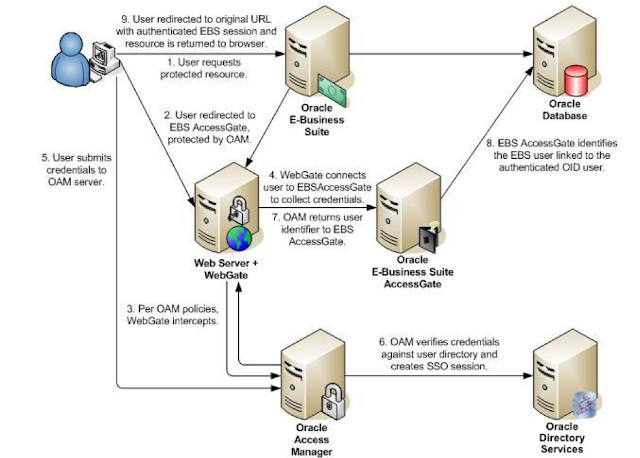
Oracle EBS integration with Oracle IDCS for SSO
Oracle EBS integration with Oracle IDCS for SSO Oracle EBS SSO? Why is it so important? Oracle E-Business Suite is a widely used application...
-
Apps password change routine in Release 12.2 E-Business Suite changed a little bit. We have now extra options to change password, as well ...
-
 Enabling TLS in Oracle Apps R12.2 Here we would be looking at the detailed steps for Enabling TLS in Oracle Apps R12.2 Introduction: ...
 -
 Oracle EBS integration with Oracle IDCS for SSO Oracle EBS SSO? Why is it so important? Oracle E-Business Suite is a widely used application...