Thursday, July 20, 2017

Oracle Weblogic Server Important Files Name, Locations and their Purpose

Oracle Weblogic Server Important Files Name, Locations and their Purpose

Directory or  Path
Purpose
Important Files Present
$DomainHome/$serverName/bin
Contains all the shell script files which is being used to start/stop and contains configuration for Admin and Managed servers.
setDomainEnv.sh
startWebLogic.sh
stopWebLogic.sh
$DomainHome/$serverName/config
Contains configuration files all important components e.g.  Domain configurtaion,  JMS, JDBC etc
config.xml
jdbc config files
jms config files
fmwconfig files etc
$DomainHome/$serverName/osb/config
This directory mainly contains all the OSB artifats e.g. Proxy Services, business Services, XSD, Xquery etc, whatever we do from OSB console, most of stuff get store here only.
All the OSB artifacts
$DomainHome/$serverName/osb/config/core/_static/Ref_Store
This folder contains files having reference to OSB proxy and business services which are tagged with JMS as consumer. This directory helps during cleanup process of OSB deployment. There could be multiple OSB services get tagged with queue which could cause issues, this directory contents will help to clean that.
.str files for JMS MDB artifacts
$DomainHome/$serverName/sbgen
This folder contains MDBs for JMS queues, which could be used for any OSB  Proxy service or JAVA application. 
ear files e.g. _ALSB_1341965872872.ear
$DomainHome/$serverName/sbgen/alsbTempJars
This folder contains the .jar files which Proxy services are using via JAVA Callout action.
jar files  e.g. tempCreateProcess8557633063030887848.jar
$DomainHome/$serverName/servers/$serverName/adr
Contains all diagnostic related data, if you have configured the Weblogic Diagnostic Framework e.g. In the event of server crash a report get generated etc, in this case a thread dumps file will generated here, also contains JMS, Datasource stats etc,  good for investigation purpose.
jvm_threads.txt, dms_metrics.txt
$DomainHome/$serverName/servers/$serverName/data/store
This directory contains the persistent file store for weblogic servers which is used for normal functionality and diagnostic functionality. Weblogic has 7 internal components e.g. JMS Messages, JTA logs, EJB Timer services, Diagnostic services etc. which uses these persistent file store.
_WLS_$serverName000000.DAT
_WLS_DIAGNOSTICS000000.DAT
$DomainHome/$serverName/servers/$serverName/data/ldap
Contains LDAP related files, contains security realm details etc.  If you delete this folder, you will lose all security realm users details exist in Weblogic Admin console.
EmbeddedLDAP.data
changelog.data
changelog.index etc
$DomainHome/$serverName/servers/$serverName/data/console
Store the Admin console preference.
ConsolePreferences.xml
$DomainHome/$serverName/servers/$serverName/security
This file contains encrypted weblogic username and password, used while starting the server.
boot.properties
$DomainHome/$serverName/servers/$serverName/tmp
This folder contains all the artifacts which is been deployed in servers, alternatively can be seen from "deployment" section from Weblogic Admin Server console, included JMS MDB artifacts as well.
All the Library like this
adf.oracle.businesseditor
adf.oracle.domain etc
ALSB Logging
ALSB Publish
em
File Transport Provider components etc
$DomainHome/$serverName/servers/stage
This is stagging directory, during server startup process, JMS MDB, J2EE, War application get copied from Admin server to Managed server at this stage directory and then Managed server refer to local stage directory for deployment and things moved from Stage to 'tmp' directory. Note: for admin server you will not see this directory.
_ALSB_1352464196062 etc
$DomainHome/$serverName/servers/$serverName/logs
Contains all the logs files for troubleshooting purpose.
access.log,
AdminServer.log
ManagedServer.log
gc.log
domain.log
AdminServer.out
ManagedServer.out files
$DomainHome/$serverName/servers/sysman/log
Contains Management Service logs and trace file for troubleshooting purpose.
emoms.log
emoms.trc
$DomainHome/$serverName/servers/cache
Contains all the cached information weblogic uses directory to store cache for various components e.g. web tire related cache, JMS cache, data sources, EJB cache etc.
.class files
$DomainHome/$serverName/config/osb/transports/sftp
This location have known_hosts file contains rss/dss ssh keys for external servers which OSB try to connect using SFTP business service and use KEY as authentication
known_hosts

Thursday, July 13, 2017

Enable/Add new langauge in Oracle Apps R12

1. Check the Character set whether new language you are enabling is supporing or not? Refer Note Note 393861.1

2. Activate new language from License Manager from Oracle Application Manager

3. Check from the tables, new language is activated or not?

SQL> select NLS_LANGUAGE from FND_LANGUAGES where INSTALLED_FLAG in ('B','I');

NLS_LANGUAGE
------------------------------
AMERICAN
SPANISH
FRENCH

4. Run Maintain Multi-lingual Tables from Adadmin

5. Run Maintain Snapshot information from Adadmin

6. Run the Translation Synchronization Patch utility (adgennls.pl) using below command

perl $AD_TOP/bin/adgennls.pl

The manifest generated from the tool is located at : $APPL_TOP/admin/$TWO_TASK/out/adgennls.txt

7. After you generate your manifest, you can go to http://updates.oracle.com/TransSync (use your My Oracle Support username and password).
   Follow the instructions on the screen to upload the manifest file. A Translation synchronization patch will be generated specifically based    on your manifest for each of your active language. The patch will synchronize the language file versions and American English file versions    in your Applications instance.

8. Install the Release 12 NLS Help for the new language (optional)

Known issues
-------------

+ Performance Issue with Maintain Multilingual Tables EGONLINS.sql And INVNLINS.sql Taking Long Time (Doc ID 1391050.1)
+ Performance Issues Using Maintain Multi-Lingual Table, INVNLINS.SQL (Doc ID 981868.1)
+ Bug 12922572 : WHEN RUNNING MAINTAIN MULTILINGUAL TABLES, EGONLINS AND INVNLINS TAKE MORE 24 HR

Monday, July 10, 2017

Creating a Boot Identity File(boot.properties) for Easier Server Start Up

Creating a Boot Identity File(boot.properties) for Easier Server Start Up

1. Shutdown Weblogic server

2. cd /biprd/p01/Middleware/user_projects/domains/bi_domain/servers/AdminServer/security
   cd /biprd/p01/Middleware/user_projects/domains/bi_domain/servers/security (Incase of Managed Webglogic server)
   create security folder in case it does not exist

3. create boot.properties file and add weblogic username and password
   vi boot.properties
   username=weblogic
   password=weblogic1

4. Start the Weblogic server

5. View boot.properties file and you will see username and password are in encrypted format
   cat boot.properties
   #Thu Jan 02 01:21:12 CST 2016
   password={AES}ZJDv6aTNMV8EVahgA6VwoCMCrLo/I2iPbnV423QS3ha\=
   username={AES}MF9QSoppOapI7sZQQugwI9BRSJOBjP1a5GyeB8ni113\=

Note: Repeat this step if there is a Managed Weblogic Server

Weblogic components Start/Stop Procedure

Weblogic components Start/Stop Procedure

Node Manager startup

1. cd /biprd/p01/Middleware/wlserver_10.3/server/bin
   ./setWLSEnv.sh
   nohup sh ./startNodeManager.sh > /tmp/startNodeManager.log &

Weblogic startup

2. cd /biprd/p01/Middleware/user_projects/domains/bi_domain/bin
   ./setDomainEnv.sh
   nohup ./startWebLogic.sh -Dweblogic.management.username=weblogic -Dweblogic.management.password=weblogic123 -Dweblogic.security.allowCryptoJDefaultPRNG=true > /tmp/startWebLogic.log &

   nohup ./startWebLogic.sh & (Use this, incase password is configured in boot.properties file)

Managed Weblogic startup

3. cd /biprd/p01/Middleware/user_projects/domains/bi_domain/bin
   ./setDomainEnv.sh
   nohup ./startManagedWebLogic.sh bi_server1 http://172.16.45.112:7001 -Dweblogic.management.username=weblogic -Dweblogic.management.password=weblogic123 & > /tmp/startManagedWebLogic.log &

   nohup ./startManagedWeblogic.sh bi_server1 (Use this incase username,password,URL is configured in boot.properties file)

1. Node Manager Shutdown

kill -9 `ps -ef | grep [N]odeManager | awk '{print $2}'`

2. Weblogic shutdown
 
   cd /biprd/p01/Middleware/user_projects/domains/bi_domain/bin
   ./setDomainEnv.sh
   ./stopWebLogic.sh -Dweblogic.management.username=weblogic -Dweblogic.management.password=weblogic123 -Dweblogic.security.allowCryptoJDefaultPRNG=true

   ./stopWebLogic.sh & (Use this, incase password is configured in boot.properties file)

3. Managed weblogic shutdown

  ./setDomainEnv.sh
  ./stopManagedWebLogic.sh bi_server1 http://172.16.45.112:7001 -Dweblogic.management.username=weblogic -Dweblogic.management.password=weblogic123

   nohup ./stopManagedWebLogic.sh bi_server1 (Use this incase username,password,URL is configured in boot.properties file)

Thursday, July 06, 2017

R 12.2 ADOP (R12.2 Online Patching)

Online patching is the most important new feature in Oracle EBS 12.2. It is the ability to patch a running system without having to take the system down for a significant period of time while the patches are applied. Even you can apply Maintenance Pack 12.2.2 or 12.2.3 or 12.2.4 once you install or upgrade to R12.2.0 base.

It will enable R12.2 PATCH Environment.
Dependancy on opatches. All Opatches must be applied before enabling ADOP.
Missing Opatches will be reported by EBS DB CodeLevel Checker script.
All AD_ZD packages should be valid before enabling them.
To implement Online Patching Run reports/scripts mentioned in Using the Online Patching Readiness Report in Oracle E-Business Suite Release 12.2 [1531121.1]
Once you enable ADOP i.e. Online Patching you cannot apply any patches through ADPATCH.
If you still want to apply any patch via adpatch, source ENABLE_ADPATCH=yes. (if oracle recommends)
All patches applied using adop utility will be applied to PATCH environment i.e. fs2.
When you want to make the patches live you can execute adop using cutover phase. It will switch filesystems.
To synchronize both filesystems i.e. fs1 and fs2 you can execute adop using fs_clone phase.
Phases:

adop phase=prepare -> copies the application code
adop phase=apply -> apply patches to PATCH Environment
adop phase=finalize -> makes ready the system for cutover
adop phase=cutover -> bounce the system and does filesystem switchover. fs2 becomes RUN environment.
adop phase=cleanup -> remove obsolete objects.
adop phase=fs_clone -> synchronize filesystems

Other adop options

adop phase=abort
adop -status -detail
adop phase=apply restart=yes
adop phase=apply options=forceapply
adop phase=apply abandon=yes
adopscanlog -latest=yes
adop phase=apply patches=123456 wait_on_failed_job=yes
adop hotpatch=yes

Eg:adop phase=apply patches=3251276_S:u3251276.drv patchtop=/u01/patches/3251276 hotpatch=yes workers=32

R 12.2 New Feature AFPASSWD utility to change password

Apps password change routine in Release 12.2 E-Business Suite changed a little bit. We have now extra options to change password, as well as some manual steps after changing the password using FNDCPASS.
There is a new utility introduced called AFPASSWD. This utility unlike FNDCPASS wont require you to enter apps and system user password, and makes it possible to separate duties between database administrator and application administrator. In most cases both these roles are done by same DBA. But in large organizations, there may be different teams that manage Database and Application. You can read about different options available in AFPASSWD in EBS Maintenance guide.
Whether you use FNDCPASS or AFPASSWD to change the APPLSYS/APPS password, you must also perform some additional steps. This is because in R12.2, the old AOL/J connection pooling is replaced with Weblogic Connection Pool ( JDBC Datasource ).  Currently this procedure is not yet automated. It would be good, if this can be automated using some WLS scripting.
AFPASSWD Usage
Changing SYSADMIN Password from application tier
AFPASSWD -f SYSADMIN
Enter the ORACLE password of Application Object Library ‘APPSUSER’:
Connected successfully to APPS.
Working…
Enter new password for user [SYSADMIN]:
Verify new password for user [SYSADMIN]:
Password is changed successfully for user SYSADMIN.
AFPASSWD completed successfully.

FOR CHANGING APPLSYS PASSWORD WE NEED TO SHUTDOWN APPLICATION TIER AND ONCE WE FINISH CHANGING THE PASSWORD WE NEED TO RUN AUTOCONFIG ON ALL TIERS

Steps will be as below

1.SHUTDOWN APPLICATION TIER SERVICES
2.CHANGE PASSWORD
3.RUN AUTOCONFIG ON ALL TIERS
4.START APPLICATION TIER SERVICES.

How to change APPLSYS Password from Application Tier
AFPASSWD -c apps@TST -s APPLSYS
Enter the ORACLE password of Application Object Library ‘APPSUSER’:
Connected successfully to APPS.
Enter the password for your ‘SYSTEM’ ORACLE schema:
Connected successfully to SYSTEM.
Working…
Enter new password for user:
Verify new password for user:
Working…
AFPASSWD completed successfully.

R 12.2: What is ETCC Tool?

R 12.2: What is ETCC Tool?

ETCC Tool Enhanced for Finding Mandatory EBS 12.2 Patches

The E-Business Suite Technology Codelevel Checker (ETCC) tool has been provided to help you identify missing database or middle tier patches that may need to be applied to your E-Business Suite Release 12.2 system.

The utility has now been significantly enhanced to map bug fixes to patches, generating a Patch Recommendation Summary that lists the patches (including versions and associated filenames) that are required for your system.

The following example shows part of an ETCC run, where the DB-ETCC script is used to identify missing database patches.

DB-ETCC Example

Why Does This Matter?

As the last section of the above example shows, there is a difference between bug fixes and patches. A bug fix ID for an issue does not change, but the patch ID that delivers the fix might: for example, the original patch could be superseded by another patch. So you need to not only know what bug fix you require, but which patch currently delivers it.

With previous versions of ETCC, the relevant patches (including Patch Set Updates and Exadata patches) had to be identified manually, by referring to the relevant documentation.  In this latest version, bug fix to patch mapping is done for you, avoiding the need for manual identification and the risk of misidentifying the patch needed. That is the principal enhancement in this version of ETCC.

Coverage

This new version of ETCC maps missing bug fixes to corresponding patches for the latest and latest but one quarterly bundles supported by EBS 12.2. You can use this version of ETCC with older bundles, but it will only list missing bug fixes (as previous versions did), and you will see a message saying "Patch mapping not available".

Obtaining ETCC

The ETCC utility can be downloaded via Patch 17537119 from My Oracle Support.

References

Oracle E-Business Suite Release 12.2: Consolidated List of Patches and Technology Bug Fixes (Doc ID 1594274.1)

Source:https://blogs.oracle.com/stevenchan/etcc-tool-enhanced-for-finding-mandatory-ebs-122-patches

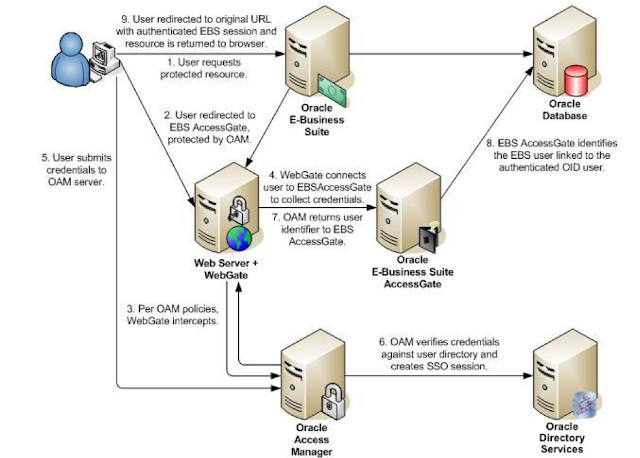
Oracle EBS integration with Oracle IDCS for SSO

Oracle EBS integration with Oracle IDCS for SSO Oracle EBS SSO? Why is it so important? Oracle E-Business Suite is a widely used application...